A quick tutorial for using the VSTi plugin SFZ Player with Band In A Box.
Good
practice is to store all your VST plugins in one folder. 2ndly, if you
plan to use soundfonts (SF2) files, also store all of these in one
folder. This makes sense, so you can locate them when time comes to use
them.
Before you get started, download the Cakewalk SFZ Player
from Cakewalk. Unzip the sfz.dll file (the plugin) to your VST plugin
folder. Next you will need a General Midi Soundfont file. BIAB only
allows a single plugin to be used at one time, so the Soundfont must
contain all of the sounds for all 128 instruments found in the General
Midi set. There are many of these available for download on the
internet. Usually, the larger the better in sound reproduced. Here is
one that is fairly small, but decent and can get you through this
tutorial - sYnerGi-8Mb.SF2. It is only 8MB. Download, unzip to your Soundfont folder.
Open BIAB and Click on the DXi icon in BIAB.
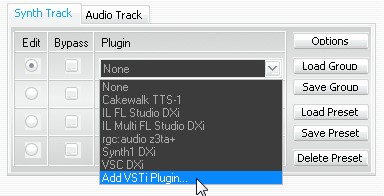
Click
on the plugin box and then scroll down and click on the 'Add VSTi
Plugin' entry - usually at the very bottom of the list of plugins.
Navigate to your VST Plugin folder and double-clickon the sfz.dll
file. This will load the SFZ plugin into Band In A Box. It now becomes
the default plugin for responding to BIAB midi signals.
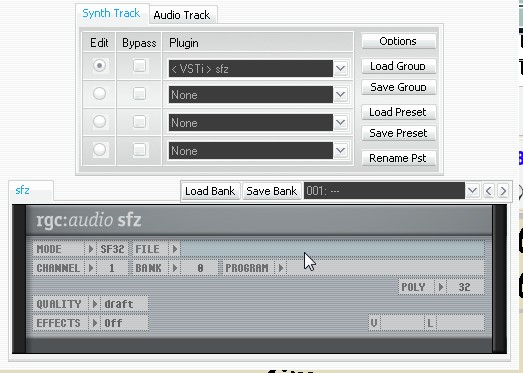
Click
in the File box in the RGC:Audio sfz window. This will open up another
navigation screen for selection of the soundfont of your choice. As
noted above, this soundfont must be a GM soundfont in order to match
the instruments that are available in BIAB.
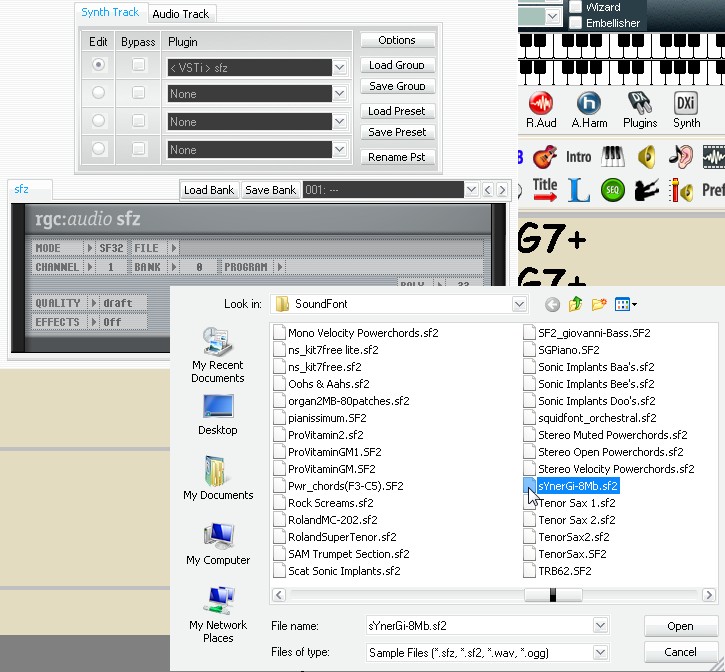
Scroll
through the Soundfonts and double-click the soundfont of choice
(sYnerGi-8Mb.sf2). This will load the SF2 file into the SFZ player.
Instruments
will be assigned to each channel (1 - 16) in the SFZ player to match
the patch (program #) assigned by BIAB. When you select an instrument
in BIAB, a program change will be sent on the specific channel to
change the instrument sound in SFZ for that channel. In this manner,
BIAB keeps the instrument sounds that you have selected, matched to
SFZ. Be sure to select the GM patch list in BIAB as the patch list to
use.
The drum channel (10) is unique, since it must
accommodate a large selection of different drum sounds all on one
channel. The General Midi spec accommodates this by assigning a
separate bank of sounds. The bank number (in this case) is 128.
So to get this bank operating on channel 10, we must tell SFZ to
use that bank. (NOTE: some soundfont players automatically make this
arrangement).
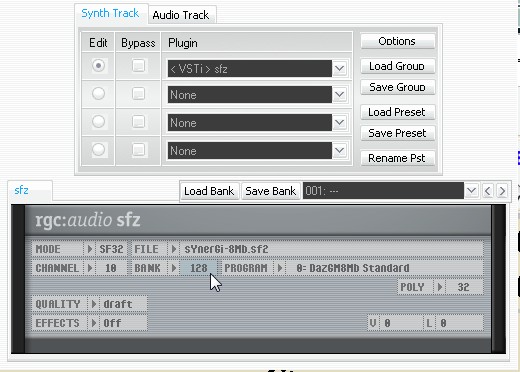
So
for this Soundfont (sYnerGi-8Mb), select Channel 10 in the Channel box
and set the BANK to 128. This will activate the matching drum bank to
BIAB's GM drums.
Now close the BIAB DXi plugin box. The SFZ Player has been set up to respond to BIAB midi arrangements.
MORE: Cakewalk has recently released the SFZ+ Player as a free download. This provides a few more bells and whistles and the ability to use multiple soundfont files.